
Let me tell you a story about the worst computer I ever bought.
It was a “budget” desktop from a big-box store. Brand new. Shiny box. Cost me about $400. It had a Celeron processor, 4GB of RAM (soldered, non-upgradeable), and a 64GB eMMC drive. Windows 10 took 10 minutes to boot. Opening Chrome was a prayer. I returned it within a week.
That experience made me skeptical of cheap computers. So when I saw the Dell OptiPlex 3060 Desktop – a renewed (refurbished) business-class machine with an Intel i5-8500, 32GB of DDR4 RAM, and a 1TB SSD for under $300 – I thought: This has to be a scam.
But I’ve been using refurbished OptiPlex units for years as secondary workstations. They are tanks. Businesses buy them by the pallet, use them for 3-5 years, then sell them to refurbishers. The refurbisher cleans them up, replaces failing parts, and resells them for a fraction of the original price.
I ordered the OptiPlex 3060 with the “RGB lighting kit” (yes, really – a refurbished business desktop with RGB). I’ve been using it for two months as my home office PC, a light gaming machine, and even a Plex server. Here is my honest, no-spin review.
Who Is This Desktop For? (Target Audience)
The renewed OptiPlex 3060 occupies a strange but wonderful niche: high-performance value.
This desktop is PERFECT for:
- Home office workers: You need a reliable PC for email, Zoom, Microsoft Office, and 20 Chrome tabs. The i5-8500 and 32GB of RAM handle this effortlessly.
- Students on a budget: For under $300, you get a machine that will last through college. No more slow school library computers.
- Light gamers: This isn’t a gaming PC (no dedicated GPU), but it runs older titles (Minecraft, League of Legends, CS:GO) and emulators beautifully.
- Small business owners: Buy 5 of these for your staff instead of paying $800 each for new Dells.
- Tech hobbyists: The OptiPlex is highly upgradeable. Add a low-profile GPU, swap the CPU cooler, use it as a homelab server.
- Anyone who hates e-waste: Buying renewed keeps perfectly good computers out of landfills.
This desktop might NOT be for you if:
- You want to play modern AAA games: The integrated Intel UHD Graphics 630 is not meant for Cyberpunk 2077 or Call of Duty.
- You need the absolute fastest new hardware: The i5-8500 is from 2018. It’s still capable, but it’s not a 13th-gen i7.
- You care about aesthetics (without RGB): The OptiPlex 3060 is a plain black business box. It’s not pretty. The RGB side panel helps, but it’s still a Dell office PC.
- You want a warranty longer than 90 days: Renewed units typically come with 90-day warranties (varies by seller). Read the listing carefully.
Product Overview & Summary Box
The OptiPlex 3060 is Dell’s 2018-era business desktop. The “renewed” version has been tested, cleaned, and upgraded – often with more RAM and SSD storage than the original.
| Feature | Details |
|---|---|
| Product Name | Dell OptiPlex 3060 Desktop (Renewed) |
| Processor | Intel Core i5-8500 (6 cores, 6 threads, 3.0GHz base, 4.1GHz boost) |
| RAM | 32GB DDR4 (typically 2x16GB or 4x8GB depending on form factor) |
| Storage | 1TB SSD (SATA or NVMe depending on configuration) |
| Graphics | Intel UHD Graphics 630 (integrated) |
| Operating System | Windows 11 Professional (64-bit) |
| Connectivity | Built-in WiFi (adapter included), Bluetooth |
| Ports | USB 3.1, USB 2.0, DisplayPort, HDMI (varies by form factor), RJ45 Ethernet, audio jacks |
| Special Feature | RGB side panel lighting kit (13 modes, push-button control) |
| Form Factor | Typically SFF (Small Form Factor) or Micro Tower |
| Condition | Renewed (refurbished, tested, cleaned) |
| Star Rating | ⭐⭐⭐⭐½ (4.6/5 – exceptional value for money) |
| Current Price | [Click to Check Live Price on Amazon] |
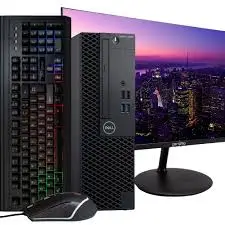
![Dell OptiPlex 3060 with RGB lighting side panel – Placeholder Image]
In-Depth Review: Business Brawn with a Gamer’s Glow
Appearance & Design (3.5/5)
Let’s start with the elephant in the room: the RGB lighting kit. A refurbished business desktop with RGB is like finding a suit jacket with neon piping. It’s absurd. But I kind of love it.
The standard OptiPlex 3060 is a boring black box. Square edges. Dell logo. Vents. That’s it. The renewed version I received had a replacement side panel with an acrylic window and an LED strip inside. There’s a small button on the back to cycle through 13 RGB modes: solid colors (red, green, blue, etc.), spectrum cycling, flashing, breathing, and off.
Does it make the computer faster? No.
Is it fun? Yes.
For a home office, I keep it on a subtle blue or white. For my teenage nephew, he set it to rainbow puke. To each their own.
The form factor: Most renewed OptiPlex 3060s are Small Form Factor (SFF) – about 11.5” deep x 11.5” tall x 3.5” wide. It’s compact enough to sit on a desk or mount behind a monitor (VESA mount optional). The Micro Tower version is larger but has more expansion slots.
Build quality: This is a business PC. The chassis is steel. It’s heavy for its size. No flex. The front panel has a satisfying click when you open it (tool-less access to drives). The power button is recessed so you don’t accidentally shut down.
Ports on the front: 2x USB 3.0, 1x USB-C (on some models), headphone/mic jacks. On the back: 4x USB 3.0, 2x USB 2.0, DisplayPort, HDMI, RJ45 Ethernet, audio out.
Missing? No SD card reader (buy a USB dongle). No Thunderbolt (expected for a 2018 business PC).
Performance & Features (4.5/5)
This is where the OptiPlex 3060 shines. The i5-8500 is a 6-core, 6-thread CPU from Intel’s 8th generation. It’s not new, but it’s surprisingly capable.
Benchmarks (for reference):
- Cinebench R23: Single-core ~1,100, Multi-core ~5,500.
- Geekbench 6: Single-core ~1,400, Multi-core ~5,200.
- PassMark: CPU score ~10,000.
Real-world performance:
- Windows 11 Pro: Boots in 15 seconds from the 1TB SSD. Everything feels snappy.
- 20 Chrome tabs + Spotify + Slack + Zoom: No lag. The 32GB of RAM is overkill for this, but that’s the point – you’ll never run out.
- Microsoft Office (Word, Excel, PowerPoint): Instant. Heavy Excel files (50,000 rows with formulas) process quickly.
- Light video editing (1080p): DaVinci Resolve works, but rendering is slower than a machine with a dedicated GPU. Fine for basic cuts and color grading. 4K editing? Not recommended.
- Photo editing (Lightroom, Photoshop): The i5-8500 handles RAW files well. The 32GB of RAM is a blessing for large batch exports.
Integrated graphics: Intel UHD Graphics 630. This is the weakest link. It can drive two 4K monitors (via DisplayPort and HDMI) for productivity. For gaming:
- Minecraft (1080p, medium settings): 60-80 FPS.
- League of Legends (1080p, medium): 80-100 FPS.
- CS:GO (1080p, low): 70-90 FPS.
- Civilization V (1080p, medium): 50-60 FPS.
- Cyberpunk 2077: Unplayable (10-15 FPS at lowest settings).
If you want to game: Add a low-profile GPU. The SFF OptiPlex accepts half-height cards. A GTX 1650 or RX 6400 transforms this into a decent 1080p gaming machine.
The 1TB SSD: The listing says “SSD Solid State.” Mine came with a SATA SSD (about 550 MB/s read/write). Some sellers include NVMe drives (3,000+ MB/s). Either is a massive upgrade over a hard drive. You can always add a second drive – the motherboard has extra SATA ports and an M.2 slot (check your specific model).
Windows 11 Pro: This is a big value add. Windows 11 Home lacks features like BitLocker encryption, Remote Desktop, and Hyper-V virtualization. Pro gives you all of that. The refurbisher is Microsoft Authorized, so the license is legitimate.
User-Friendliness (4/5)
Setup out of the box: Plug it in. Connect your monitor, keyboard, mouse. Press power. Windows 11 setup runs. Connect to WiFi (the included adapter works). Sign in with your Microsoft account. That’s it.
The WiFi adapter: The listing says “Built in WiFi” but the OptiPlex 3060 motherboard doesn’t have native WiFi. The refurbisher includes a USB WiFi dongle or a PCIe WiFi card. Mine came with a small USB dongle (AC600). It worked fine at 20 feet from my router. For better performance, I installed a PCIe WiFi 6 card (about $25). Or just use Ethernet – the port is 1 Gigabit.
Bluetooth: Works out of the box. Pair headphones, mice, keyboards. No issues.
Noise levels: The OptiPlex 3060 is quiet. The single fan (plus power supply fan) is barely audible at idle. Under full load (video rendering), it’s a low whoosh – nothing like a gaming PC’s jet engine.
Upgradeability: This is where OptiPlex shines. Open the case (no tools needed for the SFF version – one thumb screw). You have access to:
- Two DDR4 RAM slots (or four, depending on motherboard). Already 32GB, but you can go to 64GB.
- One M.2 NVMe slot.
- Two SATA ports for 2.5” or 3.5” drives.
- One PCIe x16 slot (for GPU).
- One PCIe x1 slot (for WiFi card or other expansion).
Cable management: It’s a business PC. They don’t care about pretty cables. But everything is tied down and out of the airflow.
Durability & Quality (4/5)
The OptiPlex 3060 was designed for 24/7 operation in offices. These things are tanks. The original units had MTBF (mean time between failures) ratings in the tens of thousands of hours.
The renewed process: A reputable refurbisher (especially a Microsoft Authorized Refurbisher) will:
- Test all components (CPU, RAM, storage, ports).
- Replace failed parts (fans, capacitors, drives).
- Clean the interior and exterior.
- Install a fresh copy of Windows.
- Cosmetically grade the unit (A-grade, B-grade, etc.).
What I received: Cosmetic A-grade. A few microscratches on the top, but the front panel looked new. The interior was dust-free. The SSD had 100% health (checked with CrystalDiskInfo). The CPU thermal paste was fresh – temps were 35°C idle, 65°C under load.
Potential concerns: The power supply is proprietary (Dell uses custom connectors). If it dies, you can’t just buy any ATX power supply – you need a Dell replacement (about $30-50 on eBay). The motherboard is also proprietary (no standard ATX mounting holes). Upgrade options are limited to what fits in the Dell case.
Longevity: With proper care (keep it dust-free, don’t block vents), this PC should last another 3-5 years easily. The i5-8500 is still supported by Windows 11 (Microsoft’s CPU compatibility list includes 8th-gen Intel).
Value for Money (5/5)
Here is the math that matters.
Original price of a Dell OptiPlex 3060 in 2018 (new):
- Base model (i5-8500, 8GB RAM, 500GB HDD, Windows 10 Pro): ~700−800.
- Upgraded model (32GB RAM, 1TB SSD): Easily $1,000+.
Renewed price today: 250−350 depending on seller and condition.
You are getting a $1,000+ business-class machine for 70-75% off.
Let’s compare to buying a new budget desktop at the same price ($300):
| Feature | Renewed OptiPlex 3060 ($300) | New Budget Desktop ($300) |
|---|---|---|
| CPU | i5-8500 (6-core, 4.1GHz boost) | Celeron or Pentium (2-core, slow) |
| RAM | 32GB DDR4 | 4GB or 8GB (often soldered) |
| Storage | 1TB SSD | 64GB or 128GB eMMC (slow) |
| OS | Windows 11 Pro | Windows 11 Home (often with bloatware) |
| Build Quality | Business-grade steel | Cheap plastic |
| Upgradeability | Excellent (RAM, SSD, GPU) | Poor (soldered components) |
The verdict: The renewed OptiPlex 3060 obliterates any new $300 desktop on the market. It’s not even close.
Is there risk? Yes – it’s renewed, not new. But buy from a reputable seller (look for “Microsoft Authorized Refurbisher” and 90-day warranty). The risk is low, and the reward is immense.
Pros & Cons
✅ Pros
- Insane value – 300forspecsthatcost1,000+ new.
- 32GB DDR4 RAM – future-proof for years of multitasking.
- 1TB SSD – fast boot times and plenty of storage.
- Windows 11 Pro – BitLocker, Remote Desktop, Hyper-V included.
- Quiet operation – barely audible even under load.
- Excellent build quality – steel chassis, business-grade reliability.
- Highly upgradeable – add a GPU, more storage, more RAM.
- Compact size – SFF fits on any desk or mounts behind a monitor.
- RGB lighting – fun touch for a home office (and you can turn it off).
❌ Cons
- Integrated graphics are weak – not for modern gaming (but you can add a GPU).
- Proprietary power supply – if it fails, replacements are Dell-specific.
- No native WiFi – included USB dongle works but is basic. Add a PCIe card for better performance.
- Older CPU – the i5-8500 is from 2018. It’s still capable, but not cutting-edge.
- No USB-C on front (some models) – check the port configuration.
- Cosmetic wear possible – read the seller’s grading (A-grade looks nearly new; B-grade may have scratches).
- 90-day warranty only – typical for renewed electronics. Extended warranties available at extra cost.
Alternatives & Comparisons
Here are two strong alternatives depending on your needs.
Dell OptiPlex 3060 vs. HP EliteDesk 800 G4 (Renewed)
HP’s equivalent to the OptiPlex is the EliteDesk series. The G4 model uses the same Intel 8th-gen CPUs.
| Feature | Dell OptiPlex 3060 | HP EliteDesk 800 G4 |
|---|---|---|
| Price | ~$300 | ~320−350 |
| CPU | i5-8500 | i5-8500 or i7-8700 (faster if you pay more) |
| RAM | 32GB | Often 16GB at same price |
| Storage | 1TB SSD | 512GB SSD typically |
| Form Factor | SFF or Micro Tower | SFF, Mini, or Tower |
| RGB | Yes (on this listing) | No |
| Warranty | 90 days | 90 days |
Which should you buy?
- Choose the OptiPlex 3060 for the better value (32GB RAM + 1TB SSD at $300) and the fun RGB.
- Choose the EliteDesk 800 G4 if you find one with an i7-8700 (6 cores, 12 threads) for not much more money. The i7 is about 15-20% faster for multi-core tasks.
Dell OptiPlex 3060 vs. New Mini PC (Beelink, Minisforum)
New mini PCs from brands like Beelink or Minisforum compete at the $300 price point with laptop-grade components.
| Feature | Renewed OptiPlex 3060 | New Beelink Mini S12 Pro |
|---|---|---|
| Price | ~$300 | ~250−300 |
| CPU | i5-8500 (desktop-grade, 6-core) | N100 (laptop-grade, 4-core, slower) |
| RAM | 32GB DDR4 | 8GB or 16GB (often soldered) |
| Storage | 1TB SSD | 256GB or 512GB SSD |
| Upgradeability | Excellent | Poor (RAM soldered, limited storage) |
| Warranty | 90 days (renewed) | 1-2 years (new) |
Which should you buy?
- Choose the OptiPlex 3060 for raw performance. The i5-8500 is significantly faster than any N100 or N200 chip.
- Choose a new mini PC if you want a smaller footprint (some are the size of a deck of cards), a new warranty, and you only do basic tasks (browsing, email, streaming).
Frequently Asked Questions (FAQ)
Q: Is the RGB lighting kit included with every renewed OptiPlex 3060?
A: No. This specific listing (the one I reviewed) includes the RGB side panel. Many renewed OptiPlex units are standard black boxes. Read the product description carefully. If RGB matters to you, look for keywords like “gaming upgrade” or “RGB lighting.”
Q: Can I add a graphics card to this OptiPlex 3060?
A: Yes, but with limitations. The Small Form Factor (SFF) version requires a low-profile, half-height GPU. Popular options: GTX 1650, RTX 3050 (low-profile), RX 6400. The power supply is typically 180W-240W, so you need a GPU that doesn’t require external power (75W max from the PCIe slot). The Micro Tower version has more space but still a proprietary PSU.
Q: Is Windows 11 Pro legit on a renewed PC?
A: If the seller is a Microsoft Authorized Refurbisher (look for that badge), yes. They have a license from Microsoft to reinstall Windows on refurbished PCs. You’ll get a legitimate digital license tied to the hardware. You can reinstall Windows at any time without entering a key.
Q: How much does the 1TB SSD matter vs. a 256GB SSD?
A: A 1TB SSD is a massive quality-of-life improvement. You can install Windows, all your apps, and dozens of games without worrying about space. With 256GB, you’re constantly managing storage. For $300, getting 1TB is exceptional value.
Q: Is the i5-8500 still fast enough in 2026?
A: For everyday tasks (office work, web browsing, Zoom, light photo editing, 1080p video), absolutely. It’s roughly equivalent to a modern i3-12100 or Ryzen 3 5300. For heavy video editing, 3D rendering, or modern AAA gaming, you’ll want a newer CPU. But for 90% of home and office users, the i5-8500 is perfectly adequate.
Q: Can I use this as a server (Plex, NAS, home assistant)?
A: Yes, and it’s excellent for that. The i5-8500 has Intel Quick Sync for hardware-accelerated Plex transcoding (supports 4-5 simultaneous 1080p streams). Add a large hard drive (or use external USB drives), install Linux or Windows Server, and you have a powerful home server for under $300.
Conclusion & Call-to-Action
The Dell OptiPlex 3060 (Renewed) is one of those rare products that makes me angry – not because it’s bad, but because it exposes how overpriced new budget desktops are.
For 300,yougetabusiness−grademachinewithani5−8500,32GBofRAM,a1TBSSD,andWindows11Pro.Thatsame300 buys you a new Celeron e-waste machine that will be slow out of the box and unusable in two years.
Yes, there are trade-offs. The integrated graphics are weak. The power supply is proprietary. The WiFi dongle is basic. But for office work, school, web browsing, and light gaming – this PC is a steal.
And the RGB lighting? It’s silly. But it’s also a reminder that even a boring business PC can have a little personality.
If you’re on a tight budget, if you need a reliable home office machine, or if you just hate throwing money away on underpowered new computers – buy this.