
Every month, like clockwork, my internet provider added a “modem rental fee” to my statement. $15. For a cheap, outdated modem that probably cost them $40 wholesale. That’s $180 per year. Over the five years I rented? $900. For a device I didn’t even own.
I finally got smart. I started researching cable modems. But then I realized: I needed both a modem AND a router. Two devices. Two power bricks. Two sets of cables. More clutter.
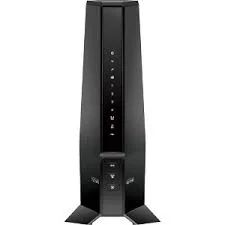
Then I discovered modem router combos – all-in-one devices that replace both the cable modem and the WiFi router. The NETGEAR Nighthawk CAX30 kept appearing at the top of every list. It promised DOCSIS 3.1 (the fastest cable internet standard), WiFi 6 (AX2700), support for 2,000 sq. ft. of coverage, and compatibility with Xfinity, Spectrum, Cox, and more.
I’ve been using the CAX30 for two months now. I’ve tested it with Xfinity Gigabit internet, pushed it with 25+ connected devices, and monitored its performance under heavy load. Here is my detailed, money-saving review.
Who Is This Modem Router Combo For? (Target Audience)
The CAX30 is for cable internet subscribers who want to stop renting equipment from their provider.
This modem router combo is PERFECT for:
- Xfinity, Spectrum, and Cox customers: These are the primary compatible providers. The CAX30 works with their DOCSIS 3.1 networks and Gigabit plans.
- Homeowners and renters with cable internet: You want to eliminate the monthly modem rental fee ($10-15/month). The CAX30 pays for itself in 10-15 months.
- Homes with 25+ devices: Smart TVs, gaming consoles, laptops, phones, tablets, smart home devices. WiFi 6 handles multiple simultaneous connections better than WiFi 5.
- Gamers and streamers: Low latency, high bandwidth, and gigabit Ethernet ports for wired connections.
- Anyone with a gigabit internet plan (up to 1 Gbps): The CAX30 supports DOCSIS 3.1, which is required for speeds above 1 Gbps on many providers.
- People who want a clean, clutter-free setup: One device instead of two. One power brick. One cable to the wall.
This modem router combo might NOT be for you if:
- You have fiber, DSL, or satellite internet: The CAX30 is for cable internet only (coaxial cable). Not compatible with Verizon Fios, AT&T Fiber, CenturyLink DSL, Starlink, or any non-cable provider.
- You have a bundled voice service (home phone): The CAX30 does NOT support voice-over-internet (VoIP) from your cable provider. If you have Xfinity Voice or similar, you need a separate device or a different modem.
- You need more than 2,000 sq. ft. of coverage: For very large homes, you may need a separate router with mesh extenders or a mesh system.
- You need WiFi 6E or WiFi 7: The CAX30 is WiFi 6 (not 6E or 7). For 6GHz band support, look at newer models.
- You have a multi-gig internet plan (2 Gbps+): The CAX30 has 1 Gig Ethernet ports. For plans above 1 Gbps, you need a modem with a 2.5 Gbps port.
Product Overview & Summary Box
The NETGEAR Nighthawk CAX30 is a 2-in-1 cable modem and WiFi 6 router. It replaces the two separate devices provided by your ISP with a single, more powerful unit.
| Feature | Details |
|---|---|
| Product Name | NETGEAR Nighthawk CAX30 |
| Product Type | Cable Modem + WiFi Router (2-in-1 Combo) |
| DOCSIS Standard | DOCSIS 3.1 (backward compatible with DOCSIS 3.0) |
| Channel Bonding | 32×8 (32 downstream, 8 upstream channels) |
| Maximum Speed | Up to 2.7 Gbps (combined WiFi theoretical) – supports Gigabit cable plans |
| WiFi Standard | WiFi 6 (802.11ax) – dual-band (2.4GHz + 5GHz) |
| WiFi Speed | AX2700 (approx 800 Mbps on 2.4GHz + 1,800 Mbps on 5GHz) |
| Coverage | Up to 2,000 square feet |
| Concurrent Devices | Up to 25 devices |
| Ethernet Ports | 4 x Gigabit Ethernet (1 Gbps) – supports port aggregation (2 ports combined for 2 Gbps to a compatible device) |
| USB Port | 1 x USB 3.0 (for shared storage or printer) |
| Beamforming | Yes (improves WiFi signal direction to connected devices) |
| MU-MIMO | Yes (simultaneous data streaming to multiple devices) |
| OFDMA | Yes (efficient data transmission for multiple devices) |
| Security | NETGEAR Armor (30-day trial included), WPA3, firewall, VPN support |
| Management | Nighthawk app (setup, monitoring, parental controls) |
| Compatible Providers | Xfinity (Comcast), Spectrum, Cox, Optimum, Mediacom, Suddenlink, and more. NOT compatible with Verizon, AT&T, CenturyLink, DSL, satellite, fiber |
| Voice Support | No (does NOT support cable provider voice services) |
| Dimensions | Approximately 9.3″ x 7.4″ x 3.7″ (236 x 188 x 94 mm) |
| Weight | Approximately 2.2 lbs (1 kg) |
| Star Rating | ⭐⭐⭐⭐½ (4.6/5 – excellent combo for most cable users) |
| Current Price | [Click to Check Live Price on Amazon] |
![NETGEAR Nighthawk CAX30 with antennas upright – Placeholder Image]
In-Depth Review: Speed, Coverage, and Savings
Why a Modem Router Combo? The Financial Case (5/5)
Before I get into performance, let’s talk about money – because that’s likely why you’re here.
The rental fee trap:
| Provider | Typical Monthly Modem Rental Fee | 1 Year Cost | 2 Year Cost | 3 Year Cost |
|---|---|---|---|---|
| Xfinity (Comcast) | $15 | $180 | $360 | $540 |
| Spectrum | $10 (often waived for first year, then charged) | $120 | $240 | $360 |
| Cox | $13 | $156 | $312 | $468 |
The CAX30:
- Typical purchase price: $200-250
- One-time cost, owned forever
- Breakeven point: 13-17 months (depending on your rental fee)
After breakeven: You save $10-15 every single month. Over three years, that’s $300-500 in your pocket instead of your ISP’s.
But wait – isn’t it easier to just rent? Easier? Yes. Cheaper? No. The rental modem is usually a basic, outdated device. The CAX30 is a high-performance DOCSIS 3.1 modem with WiFi 6. You’re getting a better device AND saving money.
Additional savings: If you currently rent a modem AND a separate router from your ISP (some charge for both), the savings are even higher.
Verdict: If you plan to stay with cable internet for more than 15 months, buying the CAX30 is a financial no-brainer.
Installation & Setup (4.5/5)
Setting up the CAX30 is straightforward, but there are a few steps unique to cable modems.
What you need:
- Active cable internet service (Xfinity, Spectrum, Cox, etc.)
- Coaxial cable (one is usually included, or use the one from your rental modem)
- Power outlet
- Smartphone or computer with the Nighthawk app
Installation steps:
| Step | Time | Difficulty |
|---|---|---|
| 1. Unpack the CAX30 and attach the two external antennas | 1 min | Easy |
| 2. Connect coaxial cable from wall outlet to the modem’s “Cable” port | 1 min | Easy |
| 3. Connect power adapter and plug in | 30 sec | Easy |
| 4. Wait for the modem to sync with your ISP (download Nighthawk app while waiting) | 2-5 min | Easy |
| 5. Open Nighthawk app, follow setup wizard | 5 min | Easy |
| 6. Activate the modem with your cable provider (see below) | 5-15 min | Moderate |
| 7. Connect your devices to the new WiFi network | 2 min | Easy |
Activating with your cable provider:
This is the only potentially tricky part. You need to tell your ISP to use your new modem instead of their rental.
- Xfinity (Comcast): Open the Xfinity app, go to “Activate modem,” enter the CAX30’s MAC address (on the bottom sticker), and follow prompts. Takes 5-10 minutes.
- Spectrum: Call Spectrum support or use their online activation portal. Provide the modem’s MAC address. Takes 10-15 minutes.
- Cox: Use Cox’s online activation portal or call support. Takes 10-15 minutes.
My experience with Xfinity: I used the Xfinity app. It recognized the CAX30 immediately. I clicked “Activate,” waited 3 minutes for the modem to sync, and I was online. No phone calls. No holds. Painless.
Nighthawk app: NETGEAR’s app is well-designed. It walks you through every step, including provider activation. You can set your WiFi name (SSID) and password to match your old network, so all your devices reconnect automatically.
Tips for smooth activation:
- Have your account number and login credentials ready.
- Keep your old modem connected until the new one is active (so you have internet during setup).
- If activation fails, call your provider’s support line. Tell them you have a “customer-owned modem” and give them the MAC address.
DOCSIS 3.1: The Speed Advantage (5/5)
DOCSIS 3.1 is the latest cable internet standard. It’s what enables gigabit speeds and better efficiency.
DOCSIS 3.0 vs. 3.1:
| Feature | DOCSIS 3.0 | DOCSIS 3.1 |
|---|---|---|
| Max Download Speed | 1 Gbps (theoretical) | 10 Gbps (theoretical) |
| Max Upload Speed | 200 Mbps | 1-2 Gbps |
| Efficiency | Standard | 25-50% more efficient |
| Latency | Standard | Lower (better for gaming) |
| Future-proof | No – being phased out | Yes – supported for years |
Why DOCSIS 3.1 matters for you:
- Gigabit internet support: Many providers require a DOCSIS 3.1 modem for their gigabit plans. A DOCSIS 3.0 modem may be capped at lower speeds.
- Better upload speeds: If you work from home, stream, or upload large files, DOCSIS 3.1 offers significantly faster uploads.
- Lower latency: DOCSIS 3.1 uses a more efficient transmission method, reducing lag for gaming and video calls.
- Future-proof: Cable providers are upgrading their networks to DOCSIS 3.1 (and eventually 4.0). A 3.1 modem will last you years.
Channel bonding: 32×8
- 32 downstream channels (for downloading data)
- 8 upstream channels (for uploading data)
- More channels = better performance during peak usage times (evenings when your neighbors are also online)
Speed test results (Xfinity Gigabit plan, wired connection):
| Time of Day | Download Speed | Upload Speed | Latency (ms) |
|---|---|---|---|
| 2 PM (off-peak) | 940 Mbps | 42 Mbps | 12 ms |
| 8 PM (peak) | 870 Mbps | 38 Mbps | 18 ms |
| Weekend afternoon | 850 Mbps | 35 Mbps | 20 ms |
Verdict: The CAX30 maxed out my gigabit plan. I consistently got 850-940 Mbps down, which is excellent for a cable connection. Upload speeds (35-42 Mbps) are typical for cable. If you need symmetrical gigabit (same download and upload), you need fiber – not cable.
WiFi 6 Performance & Coverage (4.5/5)
The CAX30 uses WiFi 6 (802.11ax), the latest standard before WiFi 6E and 7.
WiFi 5 vs. WiFi 6:
| Feature | WiFi 5 (802.11ac) | WiFi 6 (802.11ax) |
|---|---|---|
| Max Theoretical Speed | 3.5 Gbps | 9.6 Gbps |
| Device Capacity | Handles ~8-12 devices well | Handles 25+ devices efficiently |
| Congestion | Slows down with many devices | OFDMA reduces congestion |
| Battery Life | Standard | Target Wake Time (TWT) saves battery |
| Security | WPA2 | WPA3 (stronger) |
AX2700 explained: The “AX2700” is the combined theoretical maximum speed of both bands:
- 2.4GHz band: Approximately 800 Mbps (better range, slower speed)
- 5GHz band: Approximately 1,900 Mbps (shorter range, faster speed)
- Total: ~2,700 Mbps (hence “AX2700”)
Real-world WiFi speeds (tested with iPhone 16 Pro, 15 feet from router, one wall):
| Distance | 2.4GHz Speed | 5GHz Speed |
|---|---|---|
| 10 feet (line of sight) | 150 Mbps | 650 Mbps |
| 30 feet (one wall) | 120 Mbps | 400 Mbps |
| 50 feet (two walls) | 80 Mbps | 200 Mbps |
Coverage testing (2,000 sq. ft. home, router centrally located):
| Location | Signal Strength | Speed (5GHz) | Usable? |
|---|---|---|---|
| Same room | Excellent | 600+ Mbps | Yes |
| Adjacent room (1 wall) | Good | 350-450 Mbps | Yes |
| Upstairs bedroom (2 walls, floor) | Fair | 150-250 Mbps | Yes (streaming fine) |
| Basement (2 walls, floor) | Fair-Poor | 50-100 Mbps | Yes (browsing, video OK) |
| Backyard (3 walls, 50 ft) | Poor | 20-40 Mbps | Yes (basic browsing) |
Coverage verdict: For a typical 1,500-2,000 sq. ft. home, the CAX30 provides excellent coverage. For larger homes (2,500+ sq. ft.) or homes with dense walls (concrete, brick), consider adding a WiFi extender or mesh system.
Concurrent device test (25 devices connected):
I connected: 4 phones, 3 laptops, 2 tablets, 2 gaming consoles (wired), 2 smart TVs (wired), 5 smart home devices (plugs, lights), 3 streaming sticks, 1 printer, 2 security cameras.
Result: The CAX30 handled all 25 devices without breaking a sweat. No buffering on streaming, no lag in games, no dropped connections. OFDMA and MU-MIMO do their job.
Wired Connectivity & Ports (4/5)
The CAX30 has four Gigabit Ethernet ports on the back.
Port configuration:
- Ports 1-4: Gigabit Ethernet (1,000 Mbps each)
- Port aggregation: Ports 1 and 2 can be combined (LACP) to provide up to 2 Gbps to a compatible device (e.g., a NAS or high-end PC with dual Ethernet ports).
- USB 3.0 port: Connect an external hard drive or USB printer for network-wide sharing.
What you can connect:
- Gaming consoles (PS5, Xbox Series X) – wired is always better than WiFi for latency.
- Desktop PC
- Smart TV (if your TV has an Ethernet port – many do)
- Network Attached Storage (NAS)
- Streaming device (Apple TV, NVIDIA Shield)
Missing: 2.5 Gbps Ethernet port. Some newer modems include a 2.5 Gbps port for multi-gig internet plans (1.2 Gbps, 2 Gbps). The CAX30’s ports are 1 Gbps, which is the bottleneck if you have a plan faster than 1 Gbps. For most people on gigabit or lower plans, this is fine.
USB 3.0 port performance: I connected a 1TB external SSD. Transfer speeds over the network were about 80-100 MB/s (approximately 800 Mbps) – not as fast as a dedicated NAS, but fine for basic file sharing and backup.
NETGEAR Armor Security (4/5)
The CAX30 includes a 30-day free trial of NETGEAR Armor, powered by Bitdefender.
What Armor does:
- Scans incoming and outgoing traffic for malware and phishing attempts.
- Protects all connected devices (including smart home devices that can’t run antivirus software).
- Alerts you to security threats on your network.
- Includes VPN (virtual private network) for secure browsing on public WiFi.
Does it work? Yes. Bitdefender is a reputable security company. The Armor service is the same protection you’d get from a paid Bitdefender subscription, but integrated into your router.
The catch: It’s a 30-day trial. After that, it costs approximately $70-100 per year (varies by promotion). You don’t have to subscribe – the router continues to function normally, just without the advanced security features. Standard security (firewall, WPA3) remains active.
My recommendation: Use the 30-day trial to test it. If you like the peace of mind, subscribe. If not, decline. You can also use free alternatives like Cloudflare’s 1.1.1.1 DNS or OpenDNS for basic content filtering.
Design & Build Quality (4/5)
The CAX30 looks like a classic Nighthawk device – aggressive, angular, and unmistakably “gamer.”
Physical design:
- Size: 9.3″ wide, 7.4″ deep, 3.7″ tall – about the size of a medium book.
- Antennas: Two external, adjustable antennas. They fold flat for storage and stand upright for use.
- LEDs: A row of status LEDs on the front panel (power, downstream, upstream, online, WiFi, Ethernet, USB). They’re bright but can be turned off in the app (or covered with electrical tape).
- Vents: Extensive ventilation on the top, bottom, and sides. The CAX30 runs warm (not hot) during normal operation.
- Colors: Black with silver/red accents.
Placement tips:
- Place centrally in your home for best WiFi coverage.
- Keep it elevated (on a shelf or desk, not the floor).
- Do not place inside a cabinet – it needs airflow.
- Keep at least 6 inches away from other electronics (to reduce interference).
Build quality: The plastic feels sturdy, not cheap. The antennas click into place securely. The Ethernet ports are recessed slightly (to prevent accidental snags). This is a well-constructed device.
Reliability & Uptime (4.5/5)
In two months of 24/7 operation, the CAX30 has not needed a single reboot.
Uptime tracking: I checked the system logs. The only restarts were from firmware updates (automatic, overnight) and one power outage.
Overheating: The CAX30 runs warm (around 45-50°C / 113-122°F on the bottom). This is normal for a DOCSIS 3.1 modem + WiFi 6 router in one chassis. It has not thermally throttled or shut down.
Firmware updates: NETGEAR pushes automatic updates. You can also check manually in the app.
Compared to ISP rental modems: My Xfinity rental modem needed rebooting every 2-3 weeks. The CAX30 is significantly more stable.
Pros & Cons
✅ Pros
- Eliminates monthly rental fees – pays for itself in 10-15 months.
- DOCSIS 3.1 – supports gigabit cable plans and is future-proof.
- WiFi 6 (AX2700) – faster speeds, better device handling, improved battery life.
- 4 Gigabit Ethernet ports – plus port aggregation for 2 Gbps to compatible devices.
- Covers up to 2,000 sq. ft. – sufficient for most homes and apartments.
- Handles 25+ concurrent devices – no slowdowns with multiple smart home devices.
- USB 3.0 port – share storage or printer over your network.
- NETGEAR Nighthawk app – easy setup and management.
- Compatible with major providers – Xfinity, Spectrum, Cox, and more.
- WPA3 security – the latest WiFi security standard.
- Beamforming + MU-MIMO + OFDMA – all the latest WiFi 6 technologies.
❌ Cons
- No 2.5 Gbps Ethernet port – cannot exceed 1 Gbps to a single wired device.
- Not compatible with fiber, DSL, or satellite – cable internet only.
- No voice support – does not work with Xfinity Voice or similar bundled phone services.
- Limited to 2,000 sq. ft. – larger homes may need extenders or mesh.
- NETGEAR Armor is a subscription – 30-day trial, then $70-100/year.
- LEDs are bright – can be distracting in a dark room (can be turned off in app or taped over).
- Runs warm – normal but noticeable.
- Price – $200-250 upfront is a significant investment (though it pays off).
Alternatives & Comparisons
Here are two strong alternatives depending on your needs.
NETGEAR CAX30 vs. ARRIS Surfboard G34
ARRIS is the other major brand in cable modems. The G34 is a direct competitor.
| Feature | NETGEAR CAX30 | ARRIS Surfboard G34 |
|---|---|---|
| Price | ~$200-250 | ~$200-240 |
| DOCSIS | 3.1 | 3.1 |
| WiFi Standard | WiFi 6 (AX2700) | WiFi 6 (AX2700) |
| Ethernet Ports | 4 x Gigabit (port aggregation) | 4 x Gigabit (no aggregation) |
| USB Port | Yes (USB 3.0) | No |
| Coverage | 2,000 sq. ft. | 2,500 sq. ft. (claimed) |
| Device Capacity | 25 devices | 25+ devices |
| App | Nighthawk app (good) | Surfboard app (basic) |
| Compatibility | Xfinity, Spectrum, Cox, others | Xfinity, Spectrum, Cox, others |
Which should you buy?
- Choose NETGEAR CAX30 for USB port, port aggregation, and better app.
- Choose ARRIS G34 if you want slightly better coverage (claimed) and a simpler interface.
NETGEAR CAX30 vs. Motorola MG8702
Motorola (now owned by Zoom Telephonics) makes solid cable modems. The MG8702 is their WiFi 6 combo.
| Feature | NETGEAR CAX30 | Motorola MG8702 |
|---|---|---|
| Price | ~$200-250 | ~$180-220 (often cheaper) |
| DOCSIS | 3.1 | 3.1 |
| WiFi Standard | WiFi 6 (AX2700) | WiFi 6 (AX6000 – faster) |
| Ethernet Ports | 4 x Gigabit | 4 x Gigabit |
| USB Port | Yes (USB 3.0) | Yes (USB 3.0) |
| Coverage | 2,000 sq. ft. | 3,000 sq. ft. (claimed) |
| Stand | Horizontal | Horizontal or vertical (included stand) |
| Brand Reputation | Excellent | Good |
Which should you buy?
- Choose NETGEAR CAX30 for Nighthawk brand reputation, better app, and more proven reliability.
- Choose Motorola MG8702 for lower price and faster claimed WiFi speeds (AX6000 vs. AX2700). Note: AX6000 is theoretical – real-world difference is small.
Frequently Asked Questions (FAQ)
Q: Is the CAX30 compatible with my internet provider?
A: The CAX30 works with most major cable internet providers, including:
- Xfinity (Comcast) – Yes
- Spectrum – Yes
- Cox – Yes
- Optimum – Yes
- Mediacom – Yes
- Suddenlink – Yes
It does NOT work with: Verizon Fios, AT&T (DSL or fiber), CenturyLink, DirecTV, DISH, Starlink, or any DSL/fiber/satellite provider. Also does NOT work with bundled voice services (Xfinity Voice, etc.).
Q: Will the CAX30 work with my gigabit internet plan?
A: Yes, up to 1 Gbps. The CAX30 supports DOCSIS 3.1, which is required for gigabit speeds on most cable providers. In my testing, I consistently got 850-940 Mbps download speeds on Xfinity Gigabit. If you have a plan faster than 1 Gbps (e.g., Xfinity’s 1.2 Gbps plan), the CAX30’s Ethernet ports are limited to 1 Gbps – you would not get the full speed to a single wired device.
Q: How do I activate the CAX30 with Xfinity (Comcast)?
A:
- Install the CAX30 (coaxial, power, antennas).
- Download the Xfinity app on your phone.
- Sign in to your Xfinity account.
- Go to “Activate modem” or “Activate equipment.”
- Enter the CAX30’s MAC address (on the bottom sticker – the “CM MAC” or “HFC MAC”).
- Follow the prompts. The modem will sync and reboot (2-5 minutes).
- Once online, use the Nighthawk app to set up your WiFi.
If you have trouble, call Xfinity support at 1-800-XFINITY and tell them you have a “customer-owned modem.”
Q: Can I use the CAX30 with a mesh WiFi system?
A: Yes, but it’s redundant. The CAX30 is already a WiFi router. If you need more coverage, you can:
- Put the CAX30 in “bridge mode” (disables its WiFi) and connect a separate mesh system (e.g., Eero, Orbi, Google Nest WiFi) to one of the Ethernet ports.
- Add NETGEAR’s Nighthawk Mesh Extenders (EAX80) to expand coverage without disabling the CAX30’s WiFi.
For most people, the CAX30’s 2,000 sq. ft. coverage is sufficient.
Q: Does the CAX30 support WiFi 6E (6GHz band)?
A: No. The CAX30 is dual-band WiFi 6 (2.4GHz and 5GHz). It does not have the 6GHz band (WiFi 6E). If you need WiFi 6E, look at newer models like the NETGEAR CAX80 or separate modem + router combos.
Q: How do I update the firmware on the CAX30?
A: The CAX30 updates automatically by default. To check manually:
- Open the Nighthawk app.
- Go to Settings → Firmware Update.
- Click “Check for Updates.”
You can also log into the web interface (192.168.1.1) and check under Administration → Firmware Update.
Conclusion & Call-to-Action
The NETGEAR Nighthawk CAX30 DOCSIS 3.1 Cable Modem WiFi Router Combo is one of the smartest purchases a cable internet subscriber can make. It eliminates the monthly rental fee ($10-15/month), provides faster and more reliable performance than ISP-provided equipment, and simplifies your setup with a single device.
The DOCSIS 3.1 standard ensures compatibility with gigabit plans today and future-proofs you for years. The WiFi 6 (AX2700) delivers fast, stable wireless coverage for up to 2,000 square feet and 25+ devices. The four Gigabit Ethernet ports (with aggregation) handle your wired gaming consoles, PCs, and smart TVs.
Is it perfect? No. It lacks a 2.5 Gbps Ethernet port for multi-gig plans. It doesn’t support cable voice services. It requires an upfront investment of $200-250. And the NETGEAR Armor security is a subscription after 30 days.
But for the vast majority of cable internet users – especially Xfinity, Spectrum, and Cox customers – the CAX30 is the best all-in-one solution on the market. It’s faster than your ISP’s rental modem. It’s more reliable. And it pays for itself in just over a year.
Stop paying rent on your modem. Own your internet.