
You’re in a video call. The person on the other side is a pixelated, blurry figure speaking into a tin can. The lighting is harsh, the colors are off, and you spend the first five minutes asking, “Can you hear me now?” It’s a modern-day frustration we’ve all faced, especially when relying on the lackluster camera built into our laptops.
That’s where the Logitech C920x HD Pro Webcam enters the chat. For over a decade, it has been the undisputed champion of the mainstream webcam market, recommended for everyone from remote workers to new streamers. But in a world of 4K sensors and AI-powered features, does this classic still hold up? As a tech reviewer who has tested webcams from budget to broadcast-grade, I’ve kept a C920x mounted on my monitor for years. It’s time to break down why it remains a top seller and who should—or shouldn’t—buy it today.
Who Is the Logitech C920x Really For?
This webcam is a PERFECT, no-brainer choice if you:
- Work Remotely: You need reliable, professional-grade video and audio for daily Zoom, Teams, or Google Meet calls.
- Are a New Streamer or Content Creator: You want a significant upgrade from a laptop camera to start a YouTube channel, podcast, or Twitch stream without breaking the bank.
- Value Plug-and-Play Simplicity: You hate driver hassles and need a device that works instantly on Windows, macOS, and even ChromeOS.
- Want the Best Value Under $100: You seek the optimal balance of price, performance, and proven reliability.
- Need a Versatile “Just Works” Camera: Whether for online teaching, family calls, or gaming chats (including with the Nintendo Switch 2’s GameChat mode), it’s a universally compatible tool.
You might want to look at a different webcam if:
- You Demand 4K Resolution or 60fps: The C920x is capped at 1080p/30fps. For ultra-crisp detail or buttery-smooth motion, you need a newer model.
- You Stream in Consistently Low Light: While its light correction is good, dedicated content creators in dark rooms may want a webcam with a larger sensor.
- You Require Advanced Features: Built-in background removal without software (AI-powered), a physical privacy shutter, or customizable tracking are not included here.
- You Use a Console as Your Primary Platform: While it works with the Nintendo Switch 2’s new GameChat mode, its primary strength is on PC/Mac.
Logitech C920x HD Pro Webcam: At a Glance
| Feature | Details |
|---|---|
| Product Name | Logitech C920x HD Pro Webcam |
| Key Features | Full HD 1080p/30fps Video, Stereo Mics with Noise Reduction, Automatic Light Correction, Universal Compatibility (Windows, Mac, ChromeOS, Switch 2) |
| Price Range | Mid-Range (The definitive value king in its class) |
| Our Rating | 4.7 / 5 Stars |
| Best For | Remote professionals, students, and budding content creators who need a massive quality leap over a laptop cam without complexity. |
(Insert high-quality images/video here: Show 1) The webcam’s sleek design on a monitor, 2) A side-by-side comparison of laptop video vs. C920x video, 3) A close-up of the flexible clip, 4) The software interface (Logi Tune or Capture) in use.)
In-Depth Review: Why the Legend Endures
1. Appearance & Design: Understated and Utilitarian
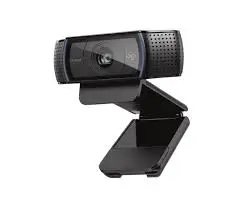
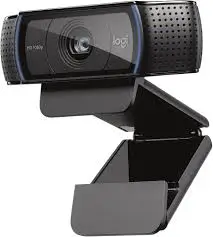
The C920x won’t win design awards, and that’s okay. It’s a compact, rectangular black plastic bar with a subtle Logitech logo. The build feels solid, not cheap. The star of the design is the versatile mounting clip. It securely clips onto laptops, monitors, or even a tripod (using the standard 1/4-inch thread hidden in the base). It’s simple, effective, and fuss-free.
2. Performance & Features: Where It Earns Its Stripes
- Consistently Excellent Video Quality: The 1080p/30fps video is sharp, colors are natural, and the autofocus is quick and reliable. The automatic light correction is its secret weapon, genuinely improving visibility in dimly lit home offices. You’ll look clear and professional, not like a washed-out ghost or a dark silhouette.
- Surprisingly Good Dual Microphones: The built-in stereo mics are a major upgrade over most laptop microphones. They capture clear voice audio and include noise reduction to minimize keyboard clatter and background hum. For most calls and basic recording, they eliminate the need for a separate mic.
- Unmatched Compatibility & Ease: This is its killer feature. You plug it in via USB-A, and it works. Instantly. No drivers needed for basic functionality on most platforms. Its certification for Zoom, Teams, and Meet guarantees optimal performance. The inclusion of a 3-month XSplit VCam license is a nice bonus for virtual background effects.
3. User-Friendliness: The Definition of Plug-and-Play
There is zero learning curve. Plug it in, position it, and join your call. The settings you might want to tweak (like disabling autofocus for a fixed focus) are easily accessible in your video conferencing app or the free Logi Tune software. It’s the most beginner-friendly webcam on the market.
4. Durability & Quality: Built Like a Tank
The C920x has a reputation for lasting for years, and its construction explains why. The plastic housing is robust, the lens is protected, and the internal components are proven. The USB cable is firmly attached and a good length. This is a workhorse device designed for daily use.
5. Value for Money: Still Unbeatable
This is the core of the C920x’s appeal. For its price, you get 90% of the performance of webcams that cost twice as much. You’re paying for refined, reliable performance, not gimmicks or marginal spec bumps. The value proposition—professional video/audio quality without complexity—remains incredibly strong.
Pros & Cons: The Balanced Verdict
Pros:
✔️ Outstanding Video & Audio for the Price: Delivers a genuinely professional presence on calls.
✔️ Legendary Plug-and-Play Simplicity: Unmatched ease of use and universal compatibility.
✔️ Excellent Low-Light Correction: Makes you look good in typical home office lighting.
✔️ Durable & Reliable: Known to work flawlessly for years.
✔️ Fantastic Value: The best performance-to-price ratio in the webcam market.
Cons:
❌ No Physical Privacy Shutter: You must rely on software or a sticky note to cover the lens.
❌ 1080p/30fps is Showing Its Age: Not future-proof for those wanting 4K or higher frame rates.
❌ Fixed Field of View: It lacks the wider or auto-framing views found on newer business-centric models.
❌ Non-Detachable Cable: If the cable fails, the entire unit is compromised.
Alternatives & Comparisons
The most logical competitor is the Logitech C922x Pro Stream.
Why choose the C920x over the C922x?
The C920x is the better value for general use. It offers nearly identical core video quality for usually $20-$30 less. Unless you specifically need the C922x’s 720p/60fps mode for smoother motion in fast-paced game streaming, the C920x is the smarter buy for work, school, and standard calls.
Why choose the C922x over the C920x?
If you are a budget-conscious game streamer, the C922x’s 60fps mode at 720p can provide smoother video for gameplay + face cam streams. It also often includes a trial of XSplit Broadcaster (more advanced than VCam) and a basic background removal feature.
Verdict: For 95% of users (remote work, content calls, standard streaming), the C920x is the better value. Only choose the C922x if 60fps is a specific, non-negotiable requirement for you.
Frequently Asked Questions
Q1: Does it work with the Nintendo Switch 2’s GameChat mode?
A: Yes, per the listing. The C920x is confirmed compatible with this new feature, which allows you to use it for chat in supported multiplayer games on the Nintendo Switch 2.
Q2: Is there a difference between the C920, C920s, and C920x?
A: The differences are minor. The original C920 has been slightly updated over time. The “x” variant (like this C920x) typically denotes a retail bundle that may include the XSplit license. Video performance is identical across all “920” models.
Q3: Can I use it with Logitech’s software?
A: Yes. You can use the basic Logi Tune app for manual controls (zoom, focus, pan/tilt if supported) or the more advanced Logitech Capture for recording and streaming with effects.
Q4: How does it compare to a laptop’s built-in camera?
A: It’s a night-and-day difference. Laptop cameras are typically low-resolution (720p or worse) with tiny sensors and terrible microphones. The C920x provides vastly sharper video, better color, and far superior audio.
Q5: Does it have a warranty?
A: Logitech typically provides a 1-year limited hardware warranty for this product.
Final Verdict & Call to Action
The Logitech C920x HD Pro Webcam is a classic for a reason. It doesn’t chase the highest specs; it masters the fundamentals. It delivers consistently excellent, professional video and clear audio with an unmatched level of plug-and-play reliability.
While it lacks the cutting-edge features of newer models, its value proposition remains rock-solid. If your goal is to look and sound great on video calls without fiddling with settings or overspending, the C920x is still arguably the best purchase you can make.
It earns a stellar 4.7 out of 5 stars, a testament to its enduring quality and utility in a crowded market.
Ready to instantly upgrade your video presence for work, streaming, or connecting with loved ones?